


AI-assisted task creation
Using AI tools to upload a document and create a task more easily.
Creating a Master Task in WorkJam can be a lengthy process. There are many fields to complete, and each one represents a decision about how the task should work. But the work often starts before users even open WorkJam.
Company admins typically coordinate tasks with Operations, Safety, Legal, or other teams using a Word document. By the time they create the task, most decisions have already been made. They still have to manually enter everything into WorkJam, field by field.
This project was WorkJam's first pilot of AI-assisted development, making it an experiment in both the product experience and how we built it.
As the solo Designer on this project, I led the design of an AI-assisted workflow that uses this existing document as a starting point, reducing manual data entry while keeping the final decision with the user.
Users already had two ways to create a Master Task:
Create one from scratch
Start from a Quick Task template
I introduced document upload as a third option within the existing creation flow, rather than creating a separate AI experience.
This was also important for rollout. The feature needed to be behind an opt-in flag because some customers require internal approval before using AI features.
And AI shouldn't be mandatory. For a simple task, uploading a document could create more friction than it removes. AI should be an easier path when it helps, not the only path.
For the first version, the AI could only process documents using a specific template. Rather than hiding this limitation, I made the solution part of the experience: Download template sits directly in the upload flow. Users can download the template, complete it, and upload it without leaving the workflow.
The biggest UX challenge was avoiding a situation where users had to manually review everything the AI extracted.
If users need to check every field, we've simply moved the work instead of removing it.
So I designed the review experience around exceptions rather than completeness.
Sections are collapsed by default and summarized with a status indicator. Users only need to open them when something requires attention.
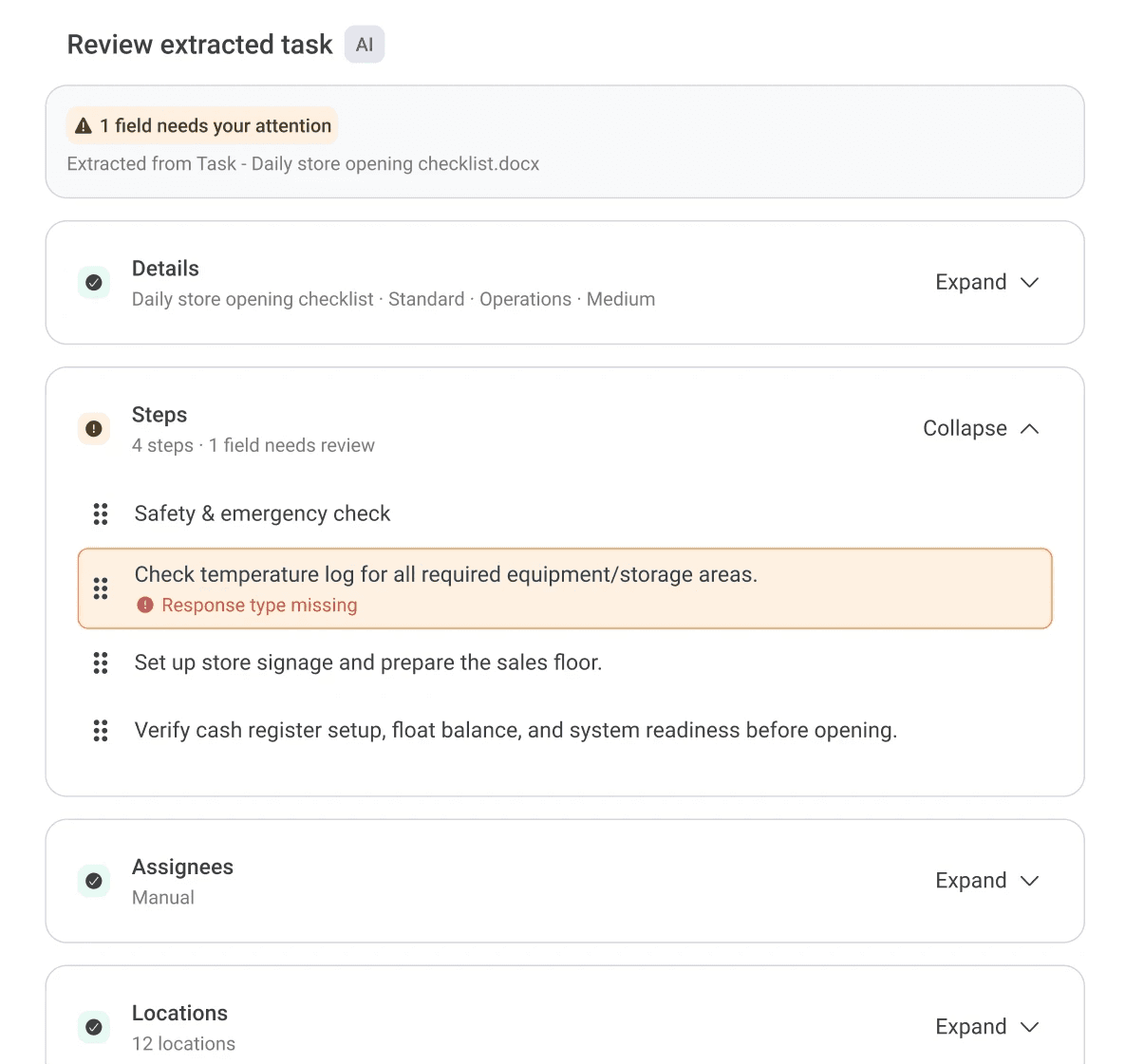
When the AI can't find required information, it leaves the field blank rather than making an assumption.
A blank is visible and can be caught by WorkJam's existing form validation. A plausible but incorrect value could look complete and eventually reach the wrong users.
Reusing the existing validation also meant we didn't need to introduce a new error-handling system.
Once the extraction is complete, users land in the existing Create a task form, now pre-populated with their document's information.
There is no separate “AI task” experience or new publishing workflow to learn. Users can review, edit, save as a draft, and continue through the existing process.
The AI improves the beginning of the workflow without changing everything around it.
It's live behind the opt-in flag, too early for numbers. Three things I want to see: whether people genuinely read the review step or learn to tap through it, whether template adherence holds or users start uploading their own documents and hitting the wall, and what an extraction actually costs per use once volume is real.